Rapidgator Premium Account 02 April 2013

0 comments
CLICK HERE TO VIEW...  


HOW TO VIEW:- 
- Click on "CLICK HERE" 
- Wait 5-6 second..
-Then click "skip" on  uppermost right corner..
- done....
 

Hotfile Premium Account 02 April 2013

0 comments
CLICK HERE TO VIEW...  


HOW TO VIEW:- 
- Click on "CLICK HERE" 
- Wait 5-6 second..
-Then click "skip" on  uppermost right corner..
- done....
 

Filefactory Premium Cookies 02 April 2013

0 comments
CLICK HERE TO VIEW...  


HOW TO VIEW:- 
- Click on "CLICK HERE" 
- Wait 5-6 second..
-Then click "skip" on  uppermost right corner..
- done....
 

Share-Online Premium Account 02 April 2013

0 comments
CLICK HERE TO VIEW...  


HOW TO VIEW:- 
- Click on "CLICK HERE" 
- Wait 5-6 second..
-Then click "skip" on  uppermost right corner..
- done....
 

Lumfile Premium Cookies 02 April 2013

0 comments
CLICK HERE TO VIEW...  


HOW TO VIEW:- 
- Click on "CLICK HERE" 
- Wait 5-6 second..
-Then click "skip" on  uppermost right corner..
- done....
 

DepositFiles Premium Cookies 02 April 2013

0 comments
CLICK HERE TO VIEW...  


HOW TO VIEW:- 
- Click on "CLICK HERE" 
- Wait 5-6 second..
-Then click "skip" on  uppermost right corner..
- done....
 

Extabit Premium Cookies 02 April 2013

0 comments
CLICK HERE TO VIEW...  


HOW TO VIEW:- 
- Click on "CLICK HERE" 
- Wait 5-6 second..
-Then click "skip" on  uppermost right corner..
- done....
 

How to use Premium Cookies

0 comments

This is a easy way to use cookie of any site with out cookie editor. We will use some script to do this. It is a details tune about uses of premium cookie. Keep visiting us for hourly update of premium cookies.
Step 1 
First go to any of your desired site like hotfile.com or fileserve.com or rapidshare.com.
How to use Premium Cookies0
Step 2
Then click ctrl+D in mozilla or <Bookmark This Page> in bookmarks option. and click Done.

How to use Premium Cookies1
Step 3
Click on bookmarks in mozilla. See in last the page you bookmarked. right click it & then properties .
How to use Premium Cookies2
Step 4
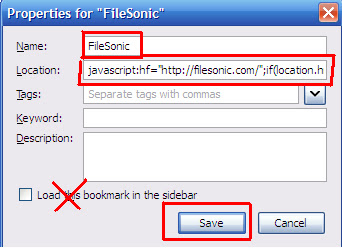
On the name field type the site name. I used Filesonic. & in the location field copy paste the script given in below this post. Click save.
How to use Premium Cookies3
Step 5
Again go to bookmarks and click the bookmark you saved. (my ex: Filesonic). Then a prompt will appear Click OK. then it will load the following site.. for me it is Filesonic.com
Step 6
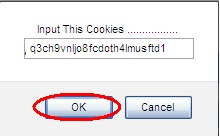
after loading the page again go to bookmarks and click on the bookmark (ex: filesonic).. when a prompt comes, paste your working cookie there and click ok. another prompt comes just click OK. $$ LOOK $$ & see you got the premium if you entered a valid cookie.
How to use Premium Cookies4
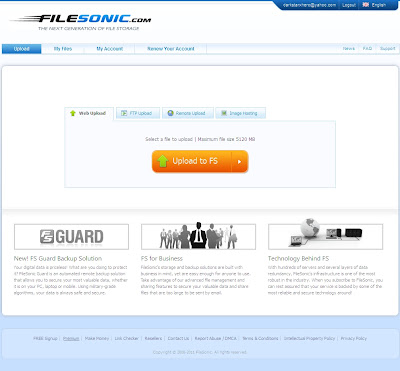
If you enter a valid your page will like below if the cookie is dead the previous page will come.
How to use Premium Cookies5

THANK YOU

Filesmonster Premium Accounts 02 April 2013

0 comments
CLICK HERE TO VIEW...  


HOW TO VIEW:- 
- Click on "CLICK HERE" 
- Wait 5-6 second..
-Then click "skip" on  uppermost right corner..
- done....
 

Turbobit.net Premium Accounts ,April 02, 2013

0 comments
CLICK HERE TO VIEW...  


HOW TO VIEW:- 
- Click on "CLICK HERE" 
- Wait 5-6 second..
-Then click "skip" on  uppermost right corner..
- done....
 
 
Copyright © CYBER HACKING