How to use Premium Cookies
This is a easy way to use cookie of any site with out cookie editor. We will use some script to do this. It is a details tune about uses of premium cookie. Keep visiting us for hourly update of premium cookies.
Step 1
First go to any of your desired site like hotfile.com or fileserve.com or rapidshare.com.
Step 2
Then click ctrl+D in mozilla or <Bookmark This Page> in bookmarks option. and click Done.
Step 3
Click on bookmarks in mozilla. See in last the page you bookmarked. right click it & then properties .
Step 4
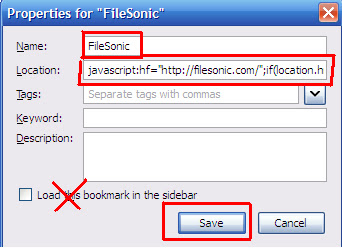
On the name field type the site name. I used Filesonic. & in the location field copy paste the script given in below this post. Click save.

Step 5
Again go to bookmarks and click the bookmark you saved. (my ex: Filesonic). Then a prompt will appear Click OK. then it will load the following site.. for me it is Filesonic.com
Step 6
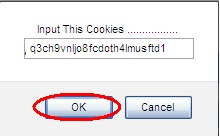
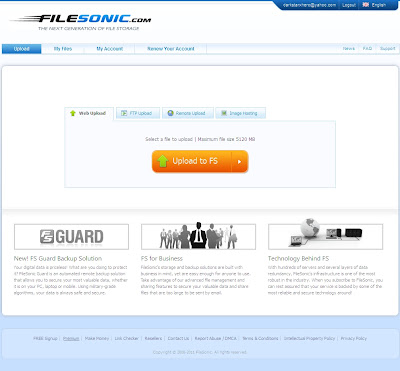
after loading the page again go to bookmarks and click on the bookmark (ex: filesonic).. when a prompt comes, paste your working cookie there and click ok. another prompt comes just click OK. $$ LOOK $$ & see you got the premium if you entered a valid cookie.

If you enter a valid your page will like below if the cookie is dead the previous page will come.

THANK YOU
How to Search Within a Site on Google
Posted by
Sahil Tanda
at
Wednesday, March 27, 2013
Labels:
google,
internet trick
0
comments
Google is foremost used search engine in the world due to its feature. It provides many great features for users which ease their work of searching on internet. One of its feature is searching within a site.For example, you want to search “How to View Last Activity of Your PC” from "hackersahil.blogspot.com". One way is to go to hackersahil.blogspot.com and search using site search option. Why bother so much if you can search directly from Google. Today, I am going to tell you how to search within a site on Google. This is how it is done.
[Search query] site:full-domain-name
Square bracket used above is not required in the search queries. It is only used to distinguish between search query and “site” feature. A very important point to note that there is no space between site, colon and domain name. Using the above example, search query will be like this.
How to View Last Activity of Your PC site : hackersahil.blogspot.com
Results of this search query are shown in the following figure.
How to View Last Activity of Your PC
Posted by
Sahil Tanda
at
Tuesday, December 25, 2012
Labels:
OS,
software
0
comments
LastActivityView is a tool for Windows os that collects information from various sources on a running system, and displays a log of actions made by the user and events occurred on this computer.
PASS --- SAHIL
Block Your Facebook Profile From Searches
Posted by
Sahil Tanda
at
Tuesday, October 02, 2012
Tuesday, October 2, 2012
Labels:
Facebook
0
comments
“How do I block people from finding my profile from doing a Facebook search?”
1. Log into your Facebook account.
2. Click on “Account” from the top right hand corner. From the drop down menu choose “Privacy Settings”.
Here’s how to stay out of public searches in Facebook:-
1. Log into your Facebook account.
2. Click on “Account” from the top right hand corner. From the drop down menu choose “Privacy Settings”.
Subscribe to:
Comments (Atom)